Billing & Payments
For Open Bidding integration, all inventory monetized via Adagio is managed directly by Google. Performance metrics and revenue details are consolidated within your Google Ad Manager interface. Adagio does not issue separate invoices or payments for Open Bidding traffic, as all financial clearing is handled by Google.
For all other integration types (Server Side and Client Side), Adagio collects revenue from the sale of the Publisher’s Advertising Spaces and pays it to the Publisher after deducting the commission and technical fees defined in the contract.
How does Adagio handle billing?
Section titled “How does Adagio handle billing?”Within the first 5 business days of each month, Adagio sends an invoice request by email (to users with “Billing” rights, refer to manage-user-access.md for more information).
This invoice request covers the previous month and includes:
- Total revenue collected on behalf of the Publisher
- Applied Commission
- Technical fees
What You Need to Do?
Section titled “What You Need to Do?”- Share your bank account details. This is usually done during the onboarding and saved for future billing periods so that payments can be processed.
- Upload your monthly invoice to Adagio platform after receiving the email request to ensure timely payment and tracking.
How to upload my monthly invoice?
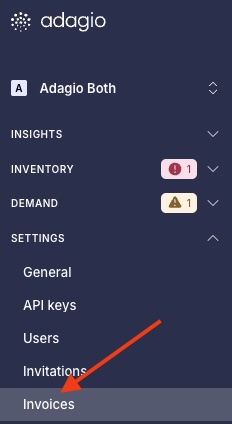
- Log in to https://app.adagio.io.
- In the left Menu > go to Settings > Invoices
You’ll be able to access all past invoices, drop your most recent invoice and monitor its status.
Currency & Taxes
Section titled “Currency & Taxes”- If payments are made in a currency other than EUR (€) or USD ($), the amount is converted using the exchange rate at the time of payment.
- Commission amounts are calculated before tax. Any applicable tax is added when the invoice is issued.
🚨 Important Reminder
Section titled “🚨 Important Reminder”Payments can only be processed once:
- Your bank details are shared with us
- Your invoice is uploaded to Adagio’s platform each month
Invoice billing information
Section titled “Invoice billing information”SAS ONFOCUS
450 Rue Baden Powel
34000 Montpellier
VAT: FR07820244770
Billing contact: billing@adagio.io (Marieke Schuit)
Payment method: Wire Transfer